
How to perform prediction in your protein sequences:
A. Input your data (Protein Sequences in fasta)& Choose model:
There are two approaches you can use to input data for prediction shown in Figure 1. Paste FASTA-format text in the area circled with the red line
2. Please upload protein sequence(s) in FASTA from your local disk via the button marked with the blue line.
3. We provide two prediction models for user via the radio button marked with the yellow line.
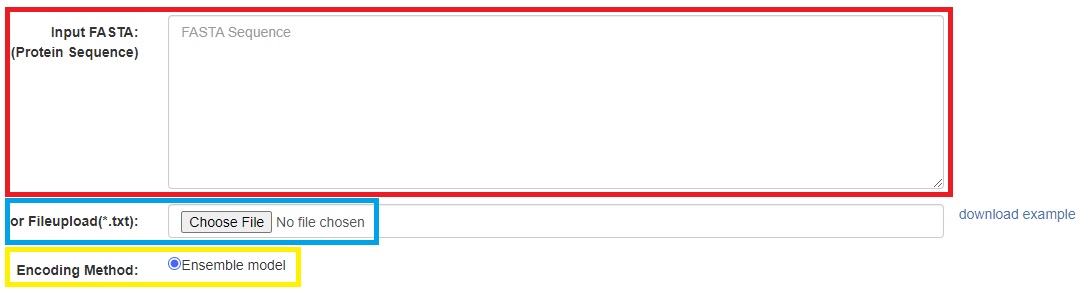
Figure 1. GUI of sequence(s) submission(change figure:PC6 marker)
B. Leave E-mail address for system notification use:
In general, the time of computation won't be too long, and you can wait in front of your screen until the prediction result is available. Otherwise, you can leave a valid e-mail address, and the system will send a mail to inform you when the result has come out. (Figure 2)

Figure 2. key-in your e-mail and check the box of "Terms of Use" to complete the submission with e-mail notification.
C. The presentation of the results
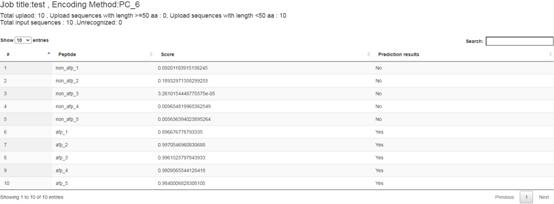
Figure 3. Prediction results of the demo FASTA file.
The column "Peptide" lists the names of input peptides. The column "Score" shows prediction scores indicating how much probability that a peptide contains AFP activity. The column "Prediction results" shows whether the peptide is an AFP. Here, the PC6_model threshold is 0.4377, and the doc2vec_model threshold is 0.3832. "YES" means the prediction score of the peptide more than threshold; otherwise, "No" says the prediction score of the peptide less than threshold. (Figure 3)
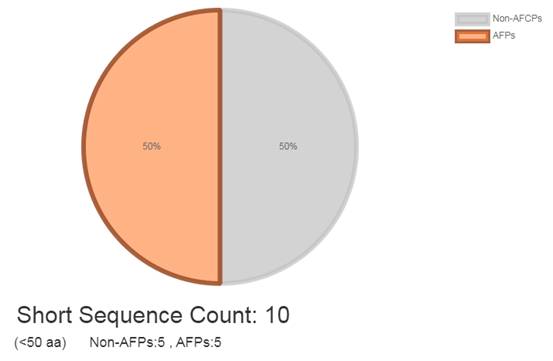
Figure 4. Visualization of AFP prediction with statistics.
There is a total of 10 peptides in the demo FASTA file, and the prediction result shows that it contains 5 AFPs and 5 Non-AFP. Long peptide and unrecognized sequence also visualized and counted which listed in the input data.
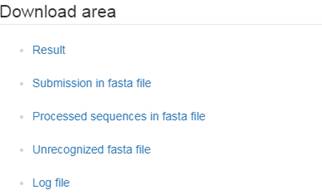
Figure 5. Available files listed in Download area
Users can download their prediction results in the "Download area" (Figure 5). Click "Result" to download prediction results represented in CSV. Here are also "Submission in fasta file," "Unrecognized fasta file," "Processed sequences in fasta file," and even "Log file" provided as references.
D. Dataset used in this study
We used 3011 AFP sequences and 3011 non-AFP sequences to construct and tune our model.[View more]
A. AFPs/non-AFP data collection
AFPs was obtained from five databases: CAMP3 (Thomas et al., 2010), DRAMP (Kang et al., 2019), YADAMP ( Piotto, et al., 2012), SATPdb (Singh et al., 2016), DBAASP (Pirtskhalava, et al., 2021). We downloaded all AFPs data and excluded (1)duplicate sequences, (2)contained unusual amino acids, (3)length of sequences that more than 50bps and less than 10bps, (4) similarity sequences(CD-HIT sequence identity cut-off = 0.95)
Non-AFPs is a combination of real-world peptides and artificially generated sequences. Real-world peptides were obtained from UniProt with the following criteria: (1) sequence length between 10 to 50, (2) without AMP-related keywords in annotation, such as 'Antimicrobial,' 'Antibiotic,' 'Amphibian defense peptide,' and 'Antiviral protein.' Artificially generated sequences were randomly generated from 20 essential amino acids, with the same length distribution as the AFP dataset.
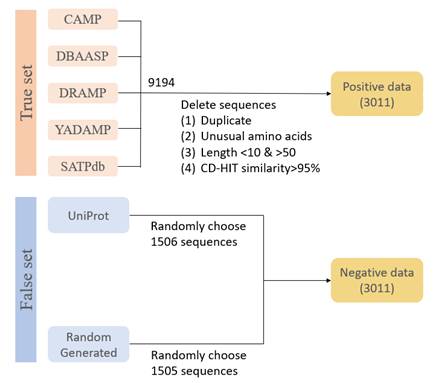
Figure 6.. Data used to build the final model for AI4AFP website.
We used 3011 AFP sequences and 3011 non-AFP sequences to construct and tune our final model. The non-AMP data, 1506 sequences were from the UniProt database, appended with 1505 data randomly generated sequences(Figure 6).
B. Data for model tuning and construction
The combination of Encoding approaches and AI models
In our preliminary results, the character embedding methods involves 'PC6' and 'doc2vec', all sequences are mapped to vectors as a matrix and input into 1-layer CNN model(Figure 7, Figure 8). In order to compare the performance of the embedding method, we divided both AFPs and non-AFPs into 2710 training dataset and 301 testing dataset. Figure 9 show the results of two embedding methods on the same architecture. Based on the results(Table 1), we preferred 'PC6' embedding method and involved in our final prediction model.
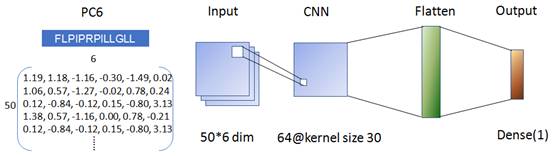
Figure 7. The architecture of PC6 + CNN prediction model
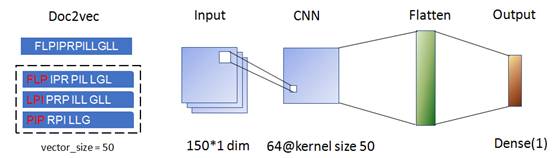
Figure 8. The architecture of Doc2vec + CNN prediction model
Table 1. The testing results of two embedding methods

The Ensemble Model for Best Performance
We used protein-encoding techniques such as document embedding (Doc2Vec) and physicochemical property encoding (PC6) to extract relevant features from sequential peptide data. Subsequently, we trained several machine learning models, such as RF, SVM, and CNN, to improve the accuracy of our predictions. To further enhance the performance of our models, we utilized ensemble strategies and combined six models to create a final ensemble model for use in AI4AFP. The ensemble model, which utilized a comprehensive dataset, demonstrated exceptional performance on the independent testing dataset. It was created by combining two encoding methods, PC6 and Word2Vec, with three machine-learning models: random forest, SVM, and CNN. Remarkably, our ensemble model surpassed existing AFP predictors, achieving a higher accuracy and MCC value of 0.95 and 0.9, respectively.
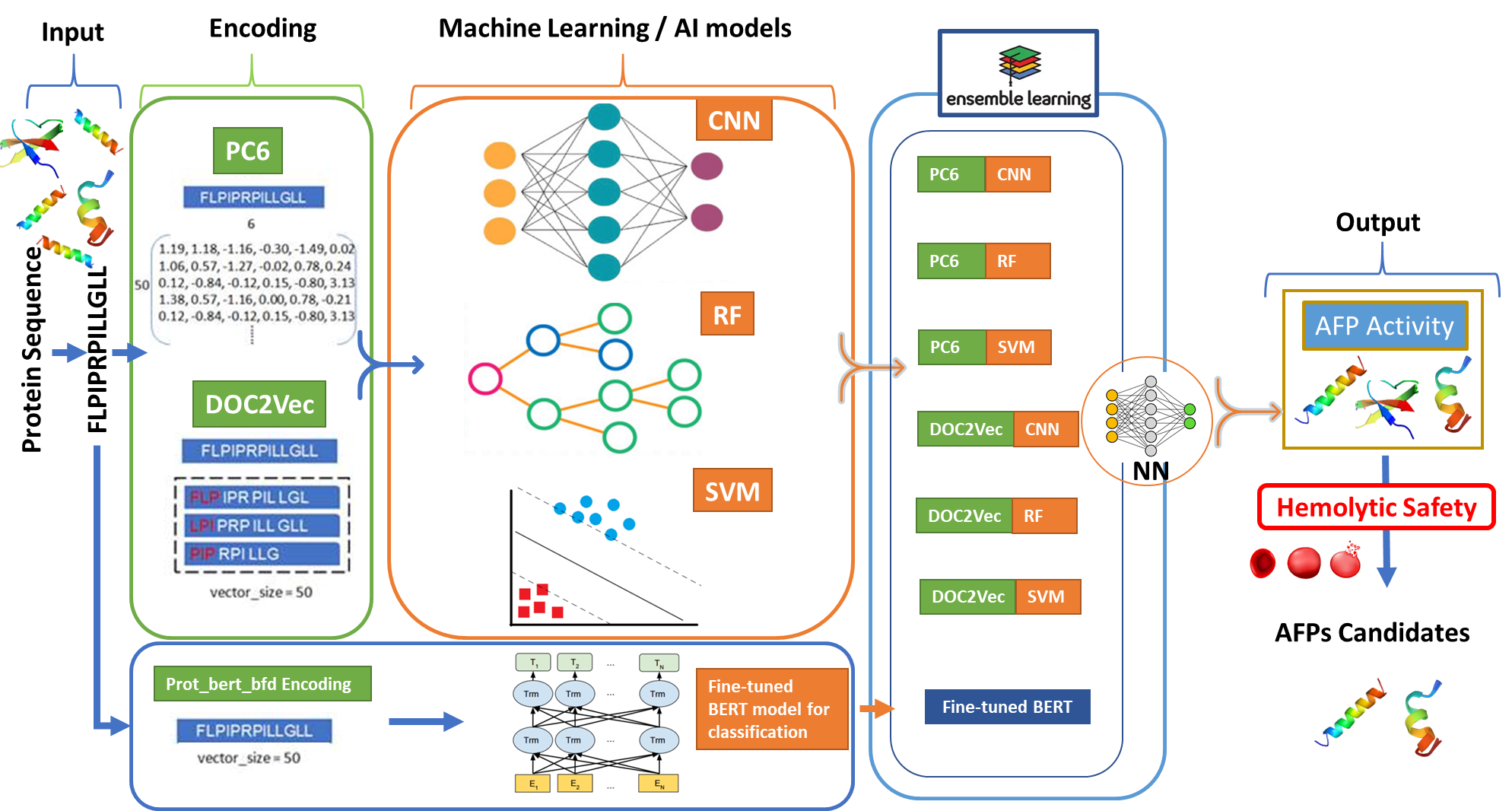
Figure 9. Ensemble model combined with several Protein encoding methods and deep learning architecture in this study. PC6 converts every peptide to a 50*6 matrix based on 6 physicochemical properties of amino acids. Doc2Vec converts every peptide to a length 50 vector using a pre-trained document embedding model. The encoded input data is passed to a 1-layer CNN and then flattened to a fully connected neural network. Finally, the sigmoid activation function transforms the output value into a number between 0 to 1.
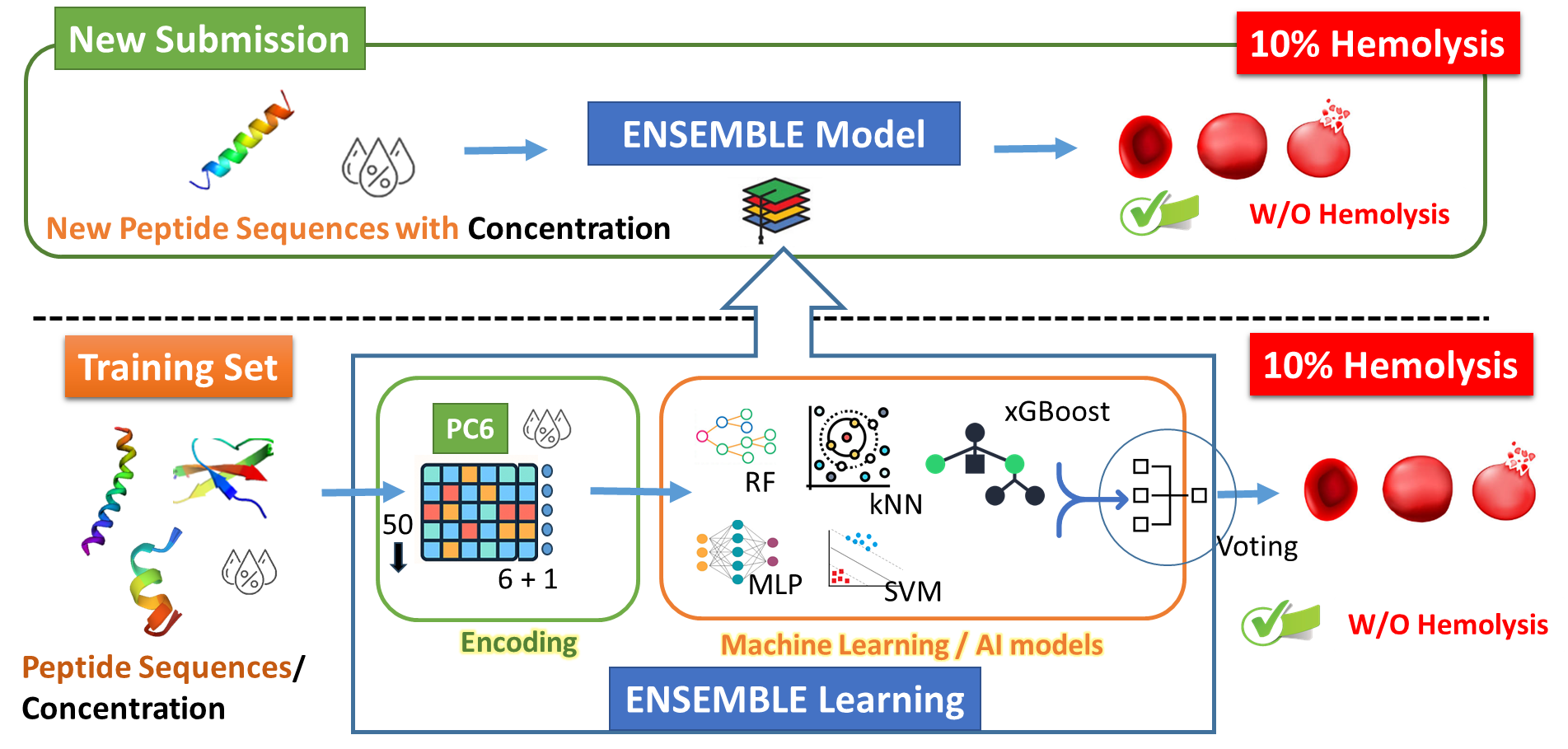
Figure 10. Schematic workflow of the ensemble-based hemolysis prediction model.
Table 2. The performances of ensemble models on our independent testing datasets.
|
Models |
Acc |
Pre |
Sen |
Spe |
MCC |
|
Ensemble_Doc2Veca |
0.94 |
0.95 |
0.92 |
0.95 |
0.87 |
|
Ensemble_ PC6b |
0.93 |
0.95 |
0.90 |
0.95 |
0.85 |
|
Ensemble_ 3_betterc |
0.94 |
0.96 |
0.92 |
0.96 |
0.88 |
|
Ensemble_alld |
0.95 |
0.97 |
0.94 |
0.97 |
0.90 |
Acc: accuracy, Pre: precision, Sen: sensitivity, Spe: specificity
a:Ensemble_Doc2Vec = Doc2Vec_RF+ Doc2Vec_SVM+ Doc2Vec _CNN
b:Ensemble_ PC6 = PC6 _RF+ PC6_SVM+ PC6 _CNN
c:Ensemble_ 3_better = Doc2Vec_SVM+ Doc2Vec_CNN+ PC6_CNN
d:Ensemble_all = Doc2Vec_RF+ Doc2Vec_SVM+ Doc2Vec_CNN+ PC6_RF+ PC6_SVM+ PC6_CNN
C. Download dataset
1. AFPs data for model tuning [download] (2710)
2. Non-AFPs data for model tuning [download] (2710)
3. AFPs data for testing [download] (301)
4. Non-AFPs data for testing[download] (301)
5. AFPs data for final model training [download] (3011)
6. Non-AFPs data for final model training [download] (3011)
Copyright © 2025 Institute of Information Science, Academia Sinica, TAIWAN. |
All Rights reserved. |